Driver San Francisco RTGI Ray Tracing Retexture Graphics Mod 2021
Driver San Francisco in 2021 still looks gorgeous and as awesome as ever. I'm pretty sure it would be a gorgeous game for new next-gen PC and consoles like Xbox Series X and PS5 but now with RTGI, and texture mods, it looks more next-gen and high graphic with ultra graphics lighting. Wasn't planning to exaggerate too many effects since the physics of this game is quite realistic, why not make the graphics realistic too! Added the good old realistic texture that I worked on looking at google map and improved it a lot and RTGI 0.21 works like a charm!
Time to download and play with the mod.
Download-
Reshade: reshade.me
RTGI 0.21: patreon.com/mcflypg
Preset and Texture: https://drive.google.com/drive/folders/1d3s2oRwcp7rwKu40LQaC2Kri4uoiyzgh?usp=sharingttps://drive.google.com/drive/folders/1uoLp4TZUxRsTfNmkn4hphTD-gNygYRtq?usp=sharingTexmod: gamebanana.com/tools/5383
- Open up reshade and click select game. Driver exe from Driver San Francisco directory.
- Then
- Select Directx 9 and select yes.
- After that, copy DSF.ini to \Driver - San Francisco folder
- Copy
- open Texmod
- Now browse Driver.EXE from top where you will see a folder icon

- Now you will see another folder icon in the middle

- Now browse from KTMX DSF.tpf
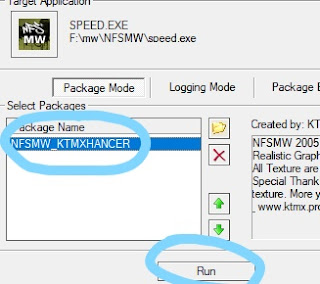
- Now Select KTMX DSF and Click Run
- Now wait at least 2 minutes (time depends on your pc)
- Open the game and press Home. Press continue and click on the plus button to and make a new present. Then check the DSF.ini That's it.


