Wednesday, March 10, 2010

Assassin's Creed 3 Remastered 4K Ray Tracing Graphics Mod Demo Gameplay - RTGI 2021

 Download

And download reshade  http://reshade.me/

Installation

  • Download Reshade and present and shader
  • Open reshadesetup Select \Assassin's Creed III Remastered\ACIII.exe
  • Select dxgi and install
  • Download RTGI 0.19 Beta version From pascal gilcher's discord and then install it by pasting files to reshade shader folder
  • Open AC3
  • press home to open menu
  • select ReShadePreset.ini
  • enjoy

Prototype 1 Ray Tracing Graphics Mod 2021 Download

 You need Reshade + RTGI 0.21 beta to run this mod

Reshade : reshade.me

Instructions

  • Install reshade
  • install RTGI also
  • Copy protoktmx.ini to game folder
  • Then Open Texmod.
  • Now browse prototypef.exe from top where you will see a folder icon
  • Now you will see another folder icon in the middle
  • Now browse p2 style v3.tpf and Alex Mercer Default HD.tpf
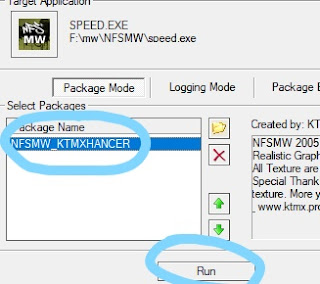
  • Now Select p2 style v3.tpf and Click Run
  • Open game select protoktmx.ini and enjoy

Wednesday, March 3, 2010

Assassin's Creed Unity Graphics Mod Ray Tracing - Remastered Ultra Photorealistic Mod 2020 FInal Download


DOWNLOAD

Reshade

 presentsrtacunity.zip
put to reshade-shaders folder.zip

Instruction

Disable Antialiasing in game first

  • Download and open reshade.
  • Select ACU.exe and select dirextx10/11/12
  • Then install and press OK.
  • After that, Download Present.
  • Now Download Shader Texture and put Texture folder to reshade-shader folder
  • Put both .ini files from ACU presentsrtacunity.zip to game folder.
  • Open the game and press home.
  • Select ACU_FAKE_RT.ini at morning and dusk and ACU_FAKE_RT - NOON.ini at day time and enjoy.

Assassin's Creed Rogue - Ray Tracing Remaster Graphics mod KTMXHancer Download Page


Installation and download


  • Select acc.exe and select dirextx10/11/12
  • Select all effects and install and press OK.
  • After that, Download acroguektmx.zip Present and put acroguektmx.ini inside \Assassin's Creed Rogue folder
  • Open the game and press home.
  • Select acroguektmx.ini
  • Present 
  • RTGI 0.19 beta (required) https://www.patreon.com/mcflypg

Assassin's Creed Brotherhood Ray Tracing RTGI Graphics Mod Download Page with instruction

  Assassin's Creed Brotherhood Ray Tracing RTGI Graphics Mod 2021

Download from Attachments below

preset : Download

Texture : Download

Texmod : Download 

And download reshade setup from  http://reshade.me/

Installation

  • Download all the files
  • Open reshade setup
  • select game \Assassins Creed Brotherhood\ACBSP.exe
  • select Directx D3D9
  • select all effect packages and download
  • after that extract  ACBROTHERHOOD.zip  to \Assassins Creed Brotherhood\  folder
  • Once you do that simply start  Texmod.exe.
  • Now browse acbsp.exe from top where you will see a folder icon Now you will see another folder icon in the middle Now browse from   Now Select (  ACBROS_TEXTURE_BY_KTMX.tpf) and Click Run
  • open game and press home
  • select acbrotherhood.ini from top menu
  • now click "Home" button and go to D3D9 tab and click the box you can see in the image below.


Monday, June 1, 2009

Driver San Francisco RTGI Ray Tracing Retexture Graphics Mod 2021 Download Page

 Driver San Francisco RTGI Ray Tracing Retexture Graphics Mod 2021

Driver San Francisco in 2021 still looks gorgeous and as awesome as ever. I'm pretty sure it would be a gorgeous game for new next-gen PC and consoles like Xbox Series X and PS5 but now with RTGI, and texture mods, it looks more next-gen and high graphic with ultra graphics lighting. Wasn't planning to exaggerate too many effects since the physics of this game is quite realistic, why not make the graphics realistic too! Added the good old realistic texture that I worked on looking at google map and improved it a lot and RTGI 0.21 works like a charm!

Time to download and play with the mod.

Download- 

Reshade: reshade.me 

RTGI 0.21: patreon.com/mcflypg 

Preset and Texture:  https://drive.google.com/drive/folders/1d3s2oRwcp7rwKu40LQaC2Kri4uoiyzgh?usp=sharingttps://drive.google.com/drive/folders/1uoLp4TZUxRsTfNmkn4hphTD-gNygYRtq?usp=sharing

Texmod: gamebanana.com/tools/5383 


  • Open up reshade and click select game. Driver exe from Driver San Francisco directory.
  • Then
  • Select Directx 9 and select yes.
  • After that, copy DSF.ini to \Driver - San Francisco folder
  • Copy
  • open Texmod
  • Now browse Driver.EXE from top where you will see a folder icon
  • Now you will see another folder icon in the middle
  • Now browse from KTMX DSF.tpf
  • Now Select KTMX DSF and Click Run
  • Now wait at least 2 minutes (time depends on your pc)
  • Open the game and press Home. Press continue and click on the plus button to and make a new present. Then check the DSF.ini  That's it.


Rainbow Six Vegas 2 HD Project

 Tutorial: https://youtu.be/9WUFtRu7X9c  (Tutorial process is the same just install it in binaries folder)   Changes: Removal of classic blo...